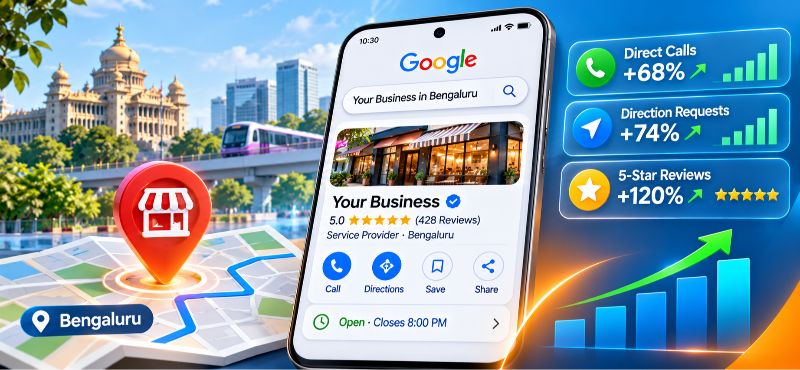
Quick Answer — How Do You Get More Calls and Directions from Google Business Profile?
To generate more phone calls and Google Maps direction clicks from your Google Business Profile (GBP), focus on five high-leverage actions: select the exact primary category and list every core service individually, maintain strict NAP (Name, Address, Phone) consistency with your website, upload authentic storefront and team photos weekly, collect steady customer reviews that naturally mention your services and Bengaluru neighborhood, and link your website button to a fast, mobile-first local landing page with click-to-call and WhatsApp actions.
When a customer in Bengaluru searches "physiotherapy clinic near me", "digital marketing agency in Chikka Banavara", or "best South Indian restaurant in Malleshwaram", they rarely scroll past the first few listings on Google Maps. They tap the Call button, hit Directions, or check the Website link straight from the Google Business Profile panel.
Yet more than 70% of local businesses claim their listing, fill in basic opening hours, and never touch it again—handing away ready-to-buy local leads to competitors who actively optimize their profiles every week.
At Pragathi IT Ads Pvt. Ltd., a full-service digital marketing and web agency in Bengaluru, we manage and optimize Google Business Profiles for clinics, retail showrooms, educational institutions, and B2B service companies across Karnataka. Below is the complete, policy-compliant Google Business Profile optimization checklist to turn your map listing into a consistent daily lead channel.
Google Business Profile Fields Ranked by Lead Impact
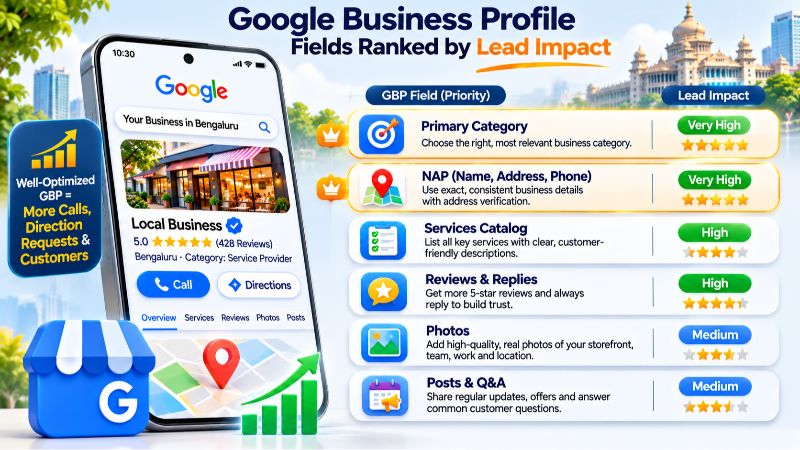
Not every profile field carries equal weight for map visibility and customer conversions. Use this priority matrix to focus on the fields that move the needle first:
GBP Section | Visibility & Conversion Impact | What to Optimize Immediately |
Primary & Secondary Categories | Very High (Direct relevance match) | Pick the single most specific primary category (e.g., "Web Designer" or "Dental Clinic"), plus 2–4 relevant secondary categories |
Business Name & Core NAP | Very High (Trust & compliance) | Match your exact real-world signage, street address, pin code, and primary phone number identically with your website footer |
Services & Products Catalog | High (Captures long-tail searches) | Add every service individually with a clear 2-sentence description and starting price range in ₹ where applicable |
Customer Reviews & Owner Replies | Very High (Map ranking + click conversion) | Build a steady weekly review flow and reply to every review within 24–48 hours |
Authentic Photos & Short Videos | High (Boosts direction & call clicks) | Upload real exterior signage, interior, team, and work-in-progress photos every week |
Weekly GBP Posts & Q&A | Moderate–High (Freshness & pre-selling) | Publish weekly updates/offers and seed 5–8 common customer questions with clear answers |
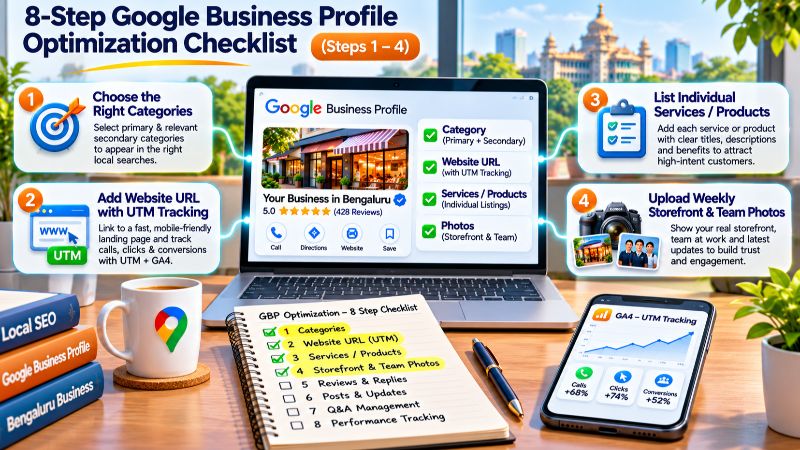
8-Step Google Business Profile Optimization Checklist
Follow these eight practical steps to strengthen your local relevance, improve click-through rates, and drive more calls and walk-ins:
1. Lock Down Your Exact Business Name, Categories & Attributes
- Use Your Real-World Legal Brand Name: Keep your GBP title identical to your physical shopfront board and business registration (for example, Pragathi IT Ads Pvt. Ltd.). Never stuff extra city names or keywords into the title—Google's representation guidelines prohibit keyword stuffing, and competitor edits or automated filters can suspend your listing.
- Select Specific Categories: Your primary category has the strongest impact on which searches trigger your profile. Choose the narrowest matching category first, then add supporting categories for secondary services.
- Complete All Relevant Attributes: Toggle attributes like "Online appointments", "Wheelchair-accessible entrance", "Free Wi-Fi", or "Women-owned"—customers frequently filter local results using these tags.
2. Align Your Website URL & UTM Tracking for Local Conversions
Many businesses point their GBP Website button to a slow, generic homepage where mobile visitors struggle to find a phone number.
- Link your profile to a fast, mobile-first local landing page—and if you operate multiple branches across Bengaluru, link each branch profile to its dedicated neighborhood page. Pairing your listing with SEO-friendly custom website development and high-converting local landing pages ensures visitors who click through actually call or message you.
- Append UTM tracking parameters (
?utm_source=google&utm_medium=organic&utm_campaign=gbp) to your GBP website link so you can separate Google Maps traffic and conversions cleanly inside Google Analytics 4 (GA4).
3. Build Out Every Service & Product Item Individually
Instead of writing one generic paragraph under "About", populate the Services and Products tabs thoroughly:
- Create a separate entry for each core offering (e.g., Technical SEO Audit, Custom WordPress Website Development, Google Ads Campaign Management).
- Write a clear, benefit-focused description for each item using natural customer search phrases, and include transparent starting prices in ₹ where practical—similar to how clear pricing breakdowns in our SEO cost guide for Bengaluru small businesses help prospects self-qualify before calling.
4. Upload High-Trust, Real-World Photos & Short Videos Weekly
Profiles with authentic, recent photos earn substantially more direction requests and website clicks than listings relying on a single logo graphic.
- Exterior Signage Photo (Mandatory): Show your storefront or building entrance from the street so customers navigating on Google Maps recognize your building immediately.
- Interior & Team Photos: Show your reception area, consultation room, workshop, or team collaborating at work—human faces build instant trust.
- 15–30 Second Vertical Videos: Upload short clips showcasing a product walkthrough, clinic tour, or completed client project. Avoid stock photography, heavy promotional text overlays, or watermarked graphics.
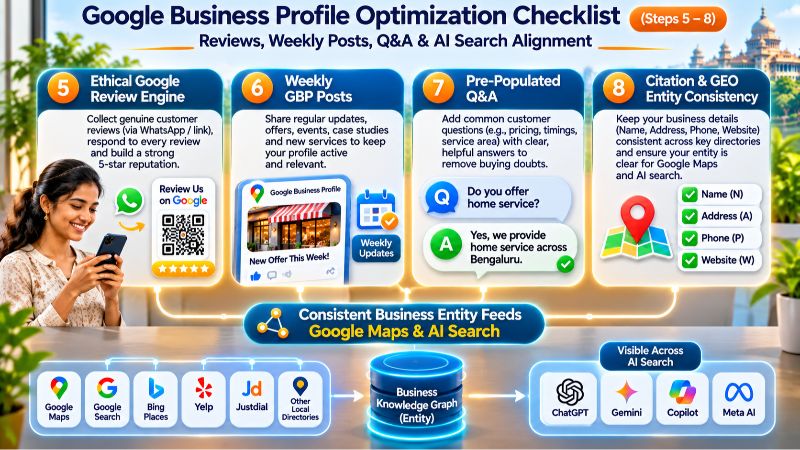
5. Run a Compliant, Consistent Google Review Engine
Reviews act as both a prominence signal for local search and the #1 decision trigger when a buyer compares three listings side by side.
- Ask Right After Value Delivery: Share your direct GBP review link via WhatsApp or SMS right after completing a consultation, delivery, or project milestone.
- Prompt Natural Context (Without Scripting): Encourage happy customers to mention which specific service they took and which Bengaluru area they visited (for example, "Smooth website launch experience with the team in Chikka Banavara").
- Never Buy Fake Reviews or Gate Negative Feedback: Google detects sudden bursts of unnatural reviews and strips them—or restricts review privileges on your listing.
- Respond to Every Review: Thank positive reviewers using natural service context, and address critical reviews calmly with a direct phone/email contact to resolve their concern offline.
6. Publish Weekly Google Business Profile Posts
Think of GBP Updates, Offers, and Events as mini-billboards right inside Google Search and Maps:
- Post once every 7 days—highlight a seasonal offer, a recent client milestone, a new service launch, or a key takeaway from your latest blog guide.
- Keep post copy concise (100–150 words), include a crisp 4:3 image, and attach a clear CTA button (Call Now, Learn More, or Book).
7. Pre-Populate the Questions & Answers (Q&A) Section
Anyone browsing Google Maps can ask—or answer—questions on your public profile. If you leave the Q&A section empty, random users may post inaccurate answers about your pricing or parking availability.
- Post your top 6–8 frequently asked customer questions (covering pricing brackets, consultation process, operating hours, service areas, and parking) from your business account and answer them clearly.
- Regularly check and upvote accurate answers so prospective callers get immediate clarity.
8. Connect GBP with Local SEO, Citations & AI Search Visibility
Your Google Business Profile does not operate in isolation—Google cross-checks your profile against your website and third-party directories:
- Ensure your exact street spelling, pin code, and phone number match across your website footer, Justdial, IndiaMART, Clutch, and social profiles, as detailed in our complete Local SEO guide for Bengaluru businesses.
- Combine GBP management with result-driven digital marketing and local SEO services so your website ranks organically right beneath the Local Pack—giving your brand two prominent spots on Page 1.
- Keep your structured data and service descriptions crystal-clear—as covered in our GEO guide for Indian SMEs, verified GBP data and consistent entity signals also help AI search assistants describe your local business accurately.
Google Business Profile Insights: Metrics That Actually Matter
Log into your GBP dashboard every two weeks and track these four conversion metrics rather than vanity impressions alone:
GBP Performance Metric | What It Measures | How to Improve It If Numbers Stall |
Calls | Direct taps on the mobile Call button from Search or Maps | Improve review star rating, verify accurate call-answering hours, and add clear service descriptions |
Direction Requests | Users tapping Directions in Google Maps to visit your location | Upload clear exterior street-view/signage photos, verify pin-drop accuracy, and mention nearby landmarks |
Website Clicks | Visitors clicking through to your linked landing page | Publish weekly GBP posts with Learn More CTAs and ensure your linked page loads in under 3 seconds |
Searches Shown For | Exact local queries triggering your business listing | Expand your Services list and align landing page headings with high-intent neighborhood terms |
5 Common Mistakes That Trigger GBP Suspensions (And How to Avoid Them)
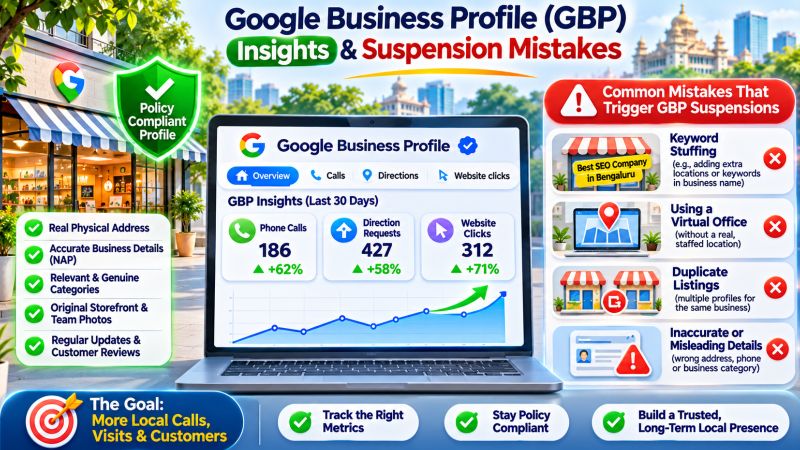
In 2026, Google's automated verification and anti-spam systems are stricter than ever. Protect your listing by avoiding these five mistakes:
- Keyword Stuffing the Business Name: Adding extra descriptors like "Best Low Cost Web Design & SEO Company Bangalore" to your legal brand name.
- Using Virtual Offices or Coworking Mail Drops: Google requires permanent exterior signage and staffed business hours during stated operating times for storefront listings.
- Displaying a Home Address for a Service-Area Business: If customers do not visit your residential flat, hide your street address and configure your listing as a Service-Area Business (SAB) covering your Bengaluru service zones.
- Creating Multiple Listings at the Same Office: Never create separate profiles for different services or departments operating out of the same suite.
- Neglecting Website Conversion Leaks: Driving hundreds of GBP clicks to a slow site with broken forms wastes valuable local intent—review our checklist on why your website isn't getting leads (12 fixes) to ensure every map visitor converts smoothly.
Strengthening Offline-to-Online Local Brand Trust
When local prospects discover your business on Google Maps, many check your social channels or offline presence before visiting. Reinforcing your local presence with geo-targeted social media marketing campaigns, cohesive corporate branding and signage design, and targeted B2B and local direct outreach ensures your brand looks unmistakable both on Maps and at your physical entrance.
For multi-branch retail chains, healthcare clinics, or service networks scaling across Karnataka, we also build custom multi-branch CRM and operations software and customer booking mobile apps to turn local map visitors into repeat customers. Explore real benchmarks across our client portfolio and local growth case studies to see how structured execution drives measurable inbound calls.
Want a Free Audit of Your Google Business Profile?
Not sure why local competitors appear above you on Google Maps—or how to unlock more daily phone calls and direction requests? Contact Pragathi IT Ads for a free Google Business Profile & Local Pack Audit. Our Bengaluru local search specialists will review your categories, NAP citations, review profile, and landing page conversion setup, then share a clear step-by-step action plan.